

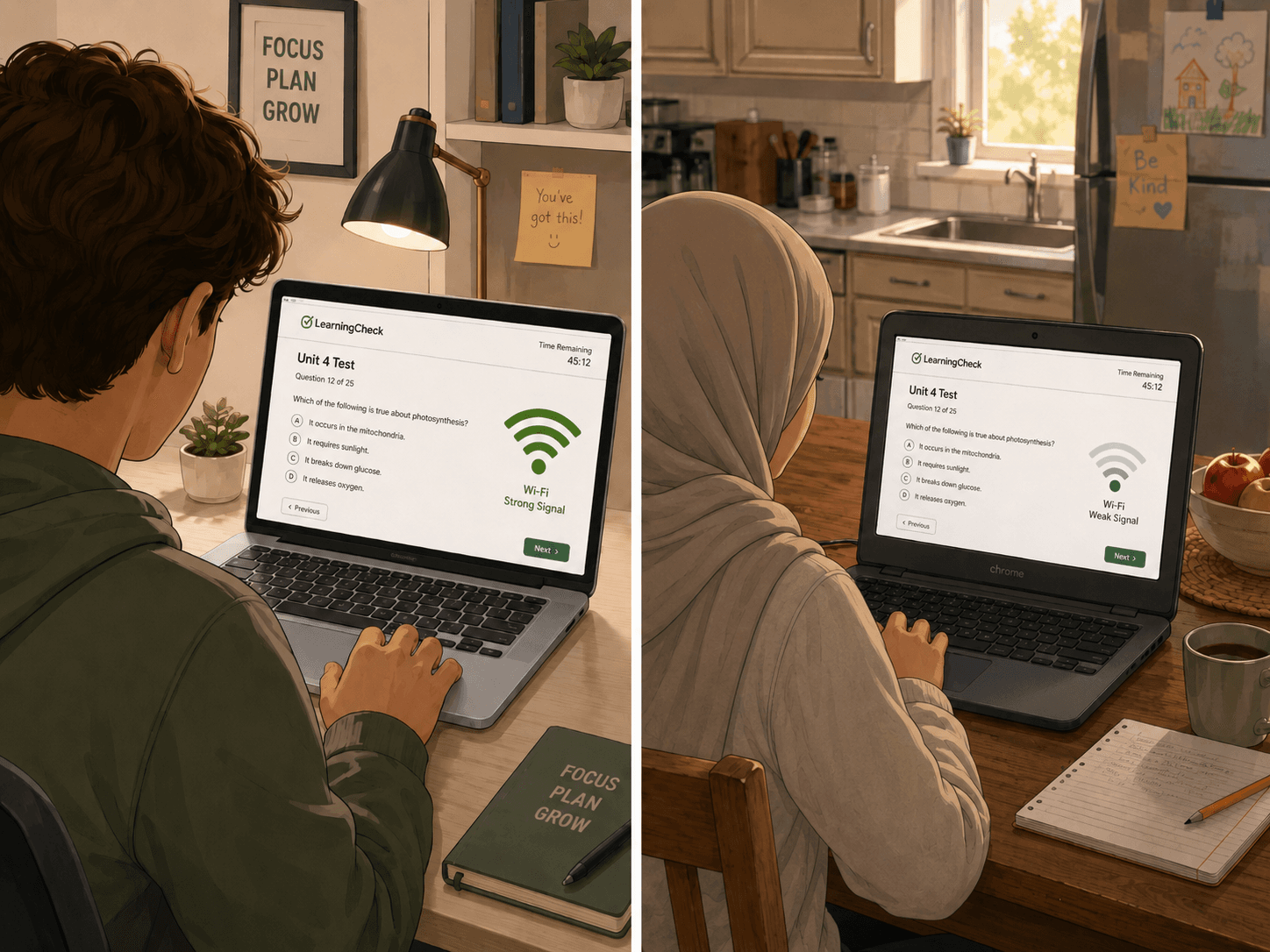
A remote exam does not happen in 'the cloud.' It happens in a real room, on a real device, over a real internet connection, in the middle of a real student's life. Some students take tests from a quiet bedroom with fiber internet and a school-issued laptop. Others share a room with siblings, rely on unstable Wi-Fi, use an older Chromebook, or need assistive technology. If a proctoring tool cannot account for those differences, it may not be protecting integrity. It may be measuring privilege.
The Digital Divide Is Not Just About Having Internet
An online proctored test may require stable internet, a compatible browser, a working camera, a microphone, enough processing power, a quiet space, and sometimes screen-sharing permissions, all at once. A student can have internet and still fail the setup check. A short disconnection may look suspicious. A frozen camera may generate a flag. A student switching tabs to fix a technical problem may be treated the same as a student trying to cheat. For teachers and administrators, the lesson is simple: remote testing depends on more than student honesty. It depends on infrastructure.
What Ohio's Remote Proctoring Pilot Shows
Ohio's 2025 Remote Proctoring Pilot Report showed that remote proctoring can be feasible, and many families liked the flexibility. Remote testing can reduce travel burdens, help students with anxiety, and make assessment more accessible for families who would otherwise need to drive long distances. But the same report also revealed login and connectivity issues, camera and microphone problems, and home distractions. The equity tension is clear: remote proctoring can remove one barrier while creating another.
“The policy question is not 'remote or in-person?' The better question is: which option gives this student a fair chance to show what they know?”
Home Is Not the Same Testing Environment for Every Student
Some students do not have a private room. Some live with siblings, caregivers, or extended family members. Some are in temporary housing. Some have pets, noise, interruptions, or caregiving responsibilities. Some students may be uncomfortable showing their living space on camera, not because they are hiding misconduct, but because home is personal. A rigid system sees a flag. A fair system sees context.
Accessibility Cannot Be an Afterthought
Students may need screen readers, captioning, extended time, breaks, assistive devices, alternative input methods, or adjusted monitoring rules. Some students cannot comfortably remain still on camera for long periods. Some may look away frequently because of disability-related needs. If the proctoring tool treats those needs as suspicious, the system is not neutral. It is creating avoidable friction for students who already have documented rights and accommodations under Section 504 and related disability-access requirements.
Device Compatibility Is an Equity Issue
Some proctoring tools work well on full desktop browsers but struggle on tablets, mobile devices, locked-down school devices, or certain Chromebooks. Screen sharing may not be available in every mobile browser. Some school devices restrict permissions. When a tool assumes every student has the same hardware, it quietly favors students with better equipment. Schools should test proctoring flows on the devices students actually use, not just on the devices adults use during vendor demos.
Why 'More Monitoring' Can Make Equity Worse
More monitoring means more ways for students to be penalized by their environment. A camera requirement disadvantages students without working cameras or private testing spaces. Microphone monitoring can punish students in noisy homes. Room scans can expose private living conditions. Automated behavior flags may misread disability-related movement, anxiety, lighting issues, or connectivity problems. This is why remote proctoring should be proportional: collect only what the test truly needs.
What Fair Remote Proctoring Should Include
- Clear setup instructions, a practice check, and support before test day
- Students know what device they need and what permissions may be required
- Plans for alternatives: loaner devices, mobile hotspots, in-person testing options, or alternate testing windows
- Teacher review of flags with context, since a tab switch should not automatically become misconduct
- Accommodations configured before the exam begins, not after a student has been flagged
- An appeal or explanation process for students
How Proctorly Supports a Less Invasive Approach
Proctorly is built around the idea that remote test integrity should not begin with surveillance. By default, tests can run with cameras off. Teachers must intentionally choose when camera or microphone monitoring is needed. Proctorly treats flags as signals for teacher review, not automatic proof of cheating. It also supports student accommodations, including camera exemptions and adjustable monitoring sensitivity, so the testing workflow can better reflect the needs of real students instead of forcing everyone through the same rigid setup.
Sources
- 1.Ohio Department of Education: 2025 Remote Proctoring Pilot Report (PDF)
- 2.NCES: Children's Internet Access at Home
- 3.ADA.gov: 2024 Web and Mobile Accessibility Rule
- 4.U.S. Department of Education: Section 504 FAPE: Frequently Asked Questions
- 5.U.S. Department of Education: Disability Discrimination and Technology Accessibility